
Prepare To Upgrade Your Home To A Smarter Home
Smarter Homes Austin provides enterprise-grade whole-home WiFi design and installation for residences in Westlake, Rollingwood, and Bee Cave, including large estates, multi-structure properties, and homes where consumer-grade routers have already failed. The large square footage, thick walls, and multiple floors common in Westlake Hills and Bee Cave custom homes create WiFi coverage challenges that mesh systems and off-the-shelf hardware simply cannot solve reliably. We design hardwired network infrastructure from the ground up with access points strategically placed throughout your home, a properly sized rack-mounted system, and full coverage extending to detached garages, guesthouses, pool areas, and outdoor entertaining spaces. With every smart home device and connected system in your home depending on network stability, Smarter Homes treats WiFi as the foundation of everything, not an afterthought.
Why can’t I get Wi-Fi in every room?” is a common question, often due to factors like router placement, building materials, and network congestion. Understanding these challenges helps identify the right solutions, such as mesh networks or Wi-Fi extenders, to ensure seamless coverage throughout your home.
Why is my WiFi so slow?" can be caused by several factors, including outdated equipment, interference from other devices, network congestion, or poor router placement. Identifying these issues and upgrading your system or optimizing your setup can significantly improve your WiFi speed and reliability.
Common Reasons for Slow WiFi and How to Fix Them
High Traffic. High Number Of Devices. At High Speed.
Our Lives Are Extremely Reliant On A High Quality Network And Advanced Wi-Fi Systems. Home Automation Systems Require Secure, Enterprise-Grade Hardware. We Consider The Wi-Fi Network To Be The Single Most Important System Inside The Home.
Ubiquiti manufactures wireless data communication products for enterprise and wireless broadband providers with a primary focus on under-served and emerging markets.
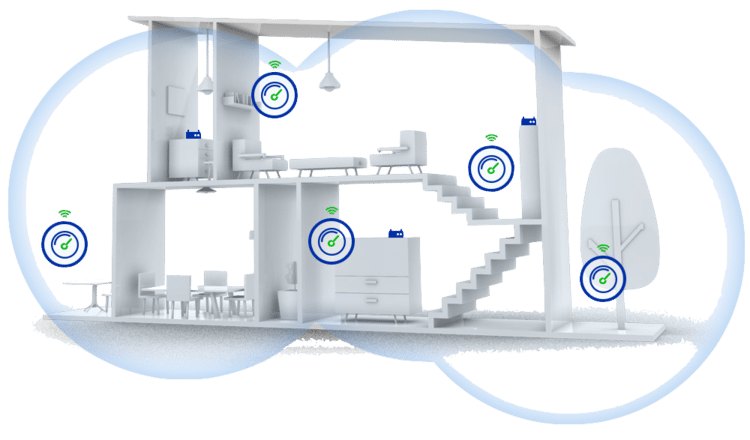

Consider The Size Of Wi-Fi Coverage You Require
Browsing slowing to a crawl, the inability to stream, dropped Wi-Fi signals, wireless dead zones—every one of these problems is maddening in a world where getting online has become, for some, as necessary as breathing.
Wi-Fi Boosting in and Outside of the Home
With high-quality WiFi access strategically placed around your home and property guarantees that your network connection is never dropped.
Having Over 15 devices connected at once CAN SLOW down YOUR CONNECTION SPEED
A managed network using WiFi access points make it possible for you to connect more devices throughout your home without issue.

Smarter Homes Of Austin Offers Professional Whole Home Wi-Fi Network Design & Installation Services In All Of The Greater Austin Texas Areas.
At Smarter Homes of Austin, we offer WiFi solutions that are tailor-made to a smart home’s needs. Our Experienced Technicians take care of the entire installation, wiring your home inconspicuously so that your décor is not affected in the least.
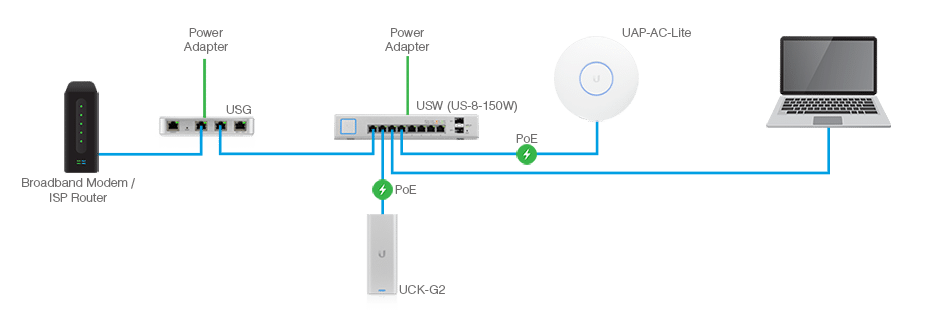
THE RIGHT WIFI SETUP
The best WiFi setup tip is to always hire a professional. A true professional can solve any issue that arrises within your home network system.
It’s clear the Internet of Everything is happening, and Wi-Fi is a fundamental enabler. Consumers are coming to understand that the Wi-Fi technology they already know and love is making their lives even better by connecting them to thousands of “Internet Of Things” products.
How Much Does A Business Level Enterprise Grade Network With Whole Home Wi-Fi Cost?
Having a Secure, Enterprise level, managed network is the first step towards treating your home system like a business. What if you never had to reboot your home network router ever again? Imagine if or when a network issue came up, that you knew for a fact that it was an outage in your area!
- 2000-2900 SqFt Home = $4,562.12
- 3000-3900 SqFt Home = $6,280.25
- 4000-4900 SqFt Home = $8,615.43
- 5000-5900 SqFt Home = $10,310.00
- 6000-6900 SqFt Home = $12,398.13
- 7000-7900 SqFt Home = $14,116.28
- 8000-8900 SqFt Home = $16,386.50
- 9000-9900 SqFt Home = $18,537.65
Frequently Asked Questions
Why does a smart home need professional WiFi instead of a consumer router?
Because a smart home's network now carries far more than phones and laptops: lighting, shades, cameras, locks, thermostats, audio, and dozens of other devices. A consumer router gets overwhelmed fast, like funneling a hundred cars onto a one-lane road. A professionally designed network plans for device count, access point placement, frequency separation, security, and interference so everything stays reliable.
Will I have dead zones with a professionally installed system?
What happens when something goes wrong with my network?
Does WiFi installation need to happen before other smart home systems are set up?
Who installs professional WiFi for smart homes in Westlake, Barton Creek, Bee Cave, and Austin?